
Dioptrin converts two-dimensional diffraction images into one-dimensional patterns and azimuthal cakes. Its numerical core is written in Rust and is available through Python, for use in Dioptas, analysis scripts and beamline workflows.
File loading and integration
fps means frames per second: the number of complete detector images processed each second. Higher fps means higher processing throughput.
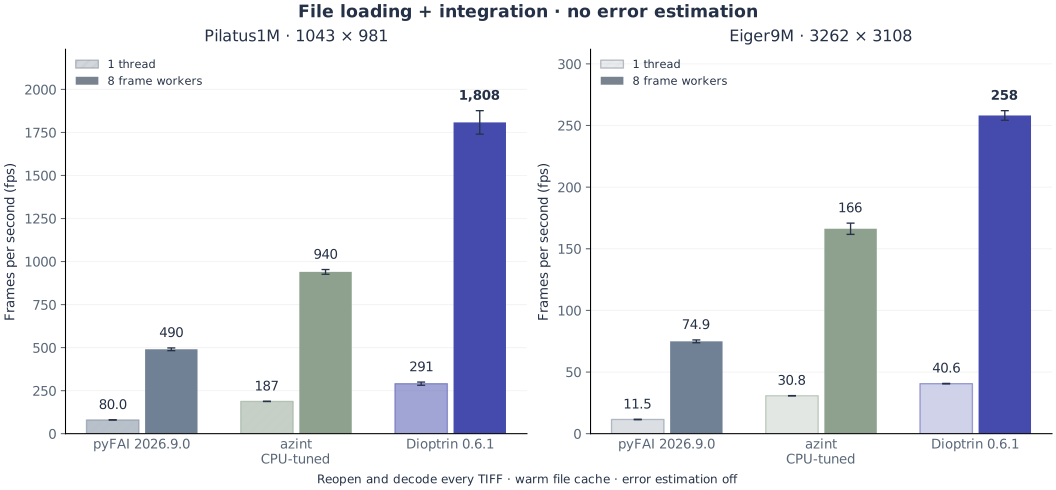
The comparison uses published Dioptrin 0.6.1, pyFAI 2026.9.0 and a CPU-tuned azint build on two detector datasets.
Every task opens and decodes its TIFF and integrates the image. Error estimation is off in the main chart. This matches the usual intensity-only calculation in Dioptas. Each library is shown with one thread and eight Python frame workers, with one integration thread per worker. Hatched bars show one thread; solid bars show eight workers.
The operating-system file cache is warm; calibration setup is measured separately. These are library file-processing rates. Dioptas currently uses its own image readers and passes arrays to the integration backend, so its full application throughput can differ. Acquisition, screen drawing and output-file writing are excluded.

At eight workers, Dioptrin achieved 3.4–3.7× the pyFAI throughput and 1.6–1.9× the tuned azint throughput for file loading and integration without Poisson error estimation on these two datasets. These factors compare equal worker counts.
The whiskers show the range of two fresh-process timing trials. Each detector has its own scale, starting at zero; that scale is kept the same in both file-processing charts.
With Poisson error estimation
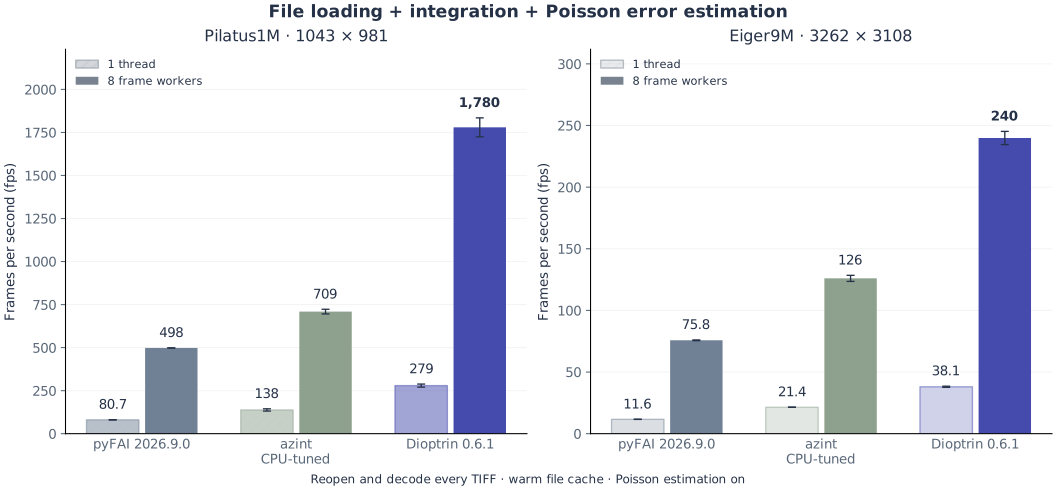
The second chart repeats the same file-loading and integration workload, with Poisson estimation enabled for every library. It uses the same images, builds, corrections, masks and worker settings as the main chart.

At eight workers, Dioptrin achieved 3.2–3.6× the pyFAI throughput and 1.9–2.5× the tuned azint throughput for file loading and integration with Poisson error estimation on these two datasets. These factors compare equal worker counts.
Poisson estimation adds a counting uncertainty alongside each integrated intensity, useful for weighted fitting and error-bearing exports. It is optional for routine viewing and off by default in Dioptas. Read the Dioptas integration guide for what the estimate means, when to enable it and how to export it.
The whiskers on these speed charts show timing variation between runs, rather than counting uncertainty in a diffraction pattern.
Measured on an Apple M4 Pro through Python on 25 October 2026, with 2,000 bins and fixed masks and corrections. Read the complete benchmark for all worker counts, setup, memory, numerical checks and the integration-only controls. Main chart SVG · Poisson chart SVG.
The comparison credits azint’s MatFRAIA paper and the pyFAI library and calibration/new-integration papers. Speed is not an accuracy ranking.
Multicore scaling and shared memory
With error estimation off, increasing from one to eight Python frame workers raised Dioptrin’s file-loading-plus-integration throughput by 6.2–6.4×, or 78–80% of ideal linear scaling on these two datasets. Four workers achieved 3.5–3.6× the one-thread rate. Workers process different images concurrently: these are batch-throughput gains, rather than the latency of one image.
Dioptrin’s workers share the calibration and integration tables. Total process memory still includes per-worker decoding buffers and temporary allocations. For these int32 TIFFs, each buffer is about 3.9 MiB per Pilatus worker or 38.7 MiB per Eiger worker.
For Eiger images, the live heap after file processing with errors off rose from 765 MiB at one worker to 1,036 MiB at eight workers. After releasing the cached file workers it was approximately 727 MiB and 727 MiB, respectively. RSS also includes allocator-retained pages and setup allocations, so it is different from the live heap.
See worker scaling and memory measurements.
What it supports
- One- and two-dimensional integration with geometric pixel splitting or configurable supersampling.
- Detector geometry from PONI files, masks, solid-angle and polarization corrections.
- Poisson uncertainties and a separate measure of azimuthal intensity spread.
- Parallel Python batches and streams, with shared calibration data and reusable file-decoding buffers.
Use Dioptrin
Dioptrin requires a license. Please contact me if you would like to use it in Dioptas, in your own analysis scripts, or at a beamline. Downloading the package does not activate the integration engine.
Dioptas can use Dioptrin as an optional licensed integration backend. pyFAI remains available when Dioptrin is not activated or a requested operation needs that backend.
Binary wheels are available for standard CPython 3.11–3.15 on Windows x86-64, macOS Intel and Apple silicon, and Linux x86-64 and ARM64. In a compatible Python environment:
python -m pip install dioptrin==0.6.1After receiving a license, follow the supplied activation instructions. For Dioptas, Dioptrin must be installed and activated in the environment used by the application. Contact me about a license or your intended workflow.